Grading
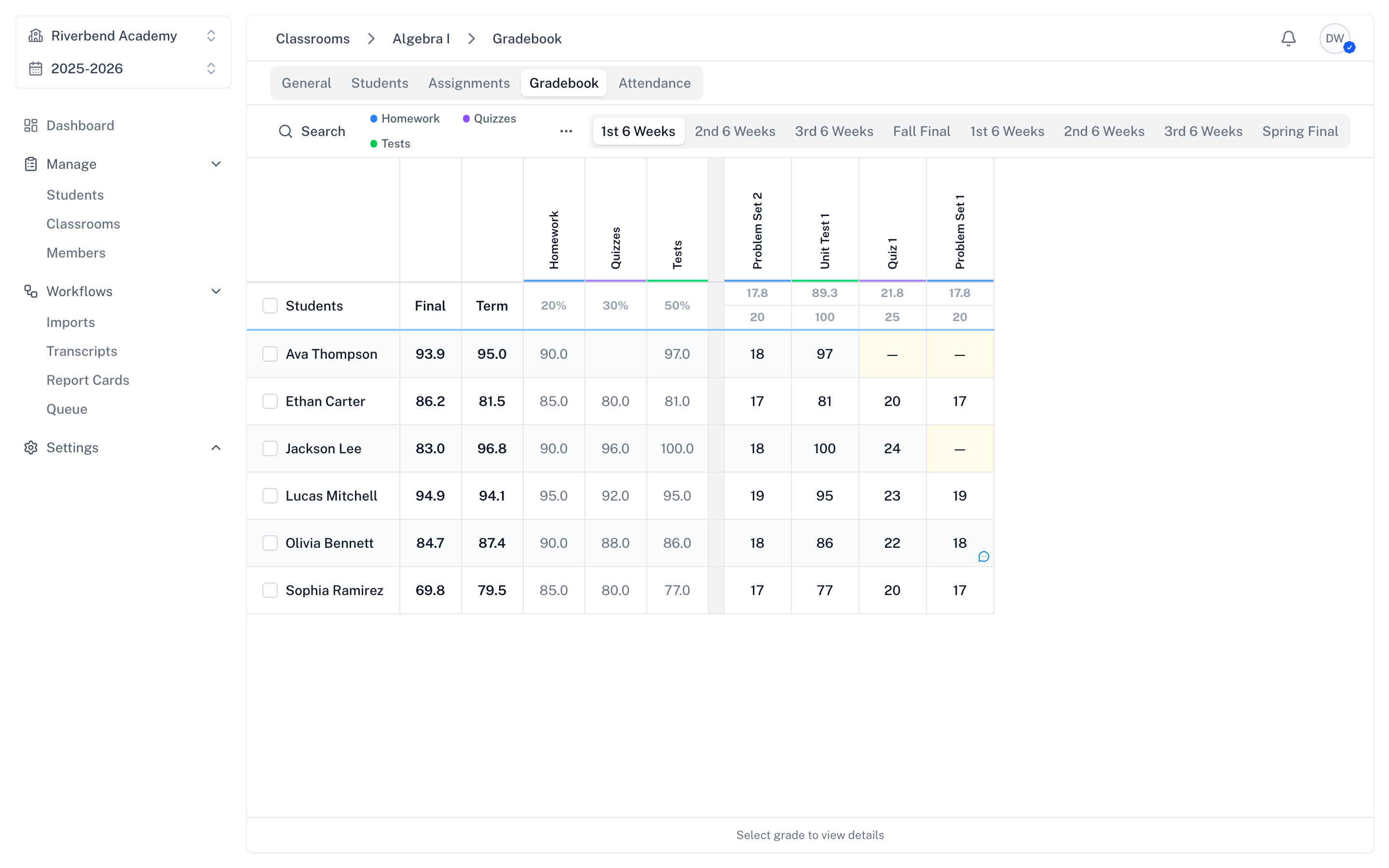
The gradebook is where you record student grades and track academic progress. It's a spreadsheet-style interface designed for fast keyboard-driven grading.
Navigating to the Gradebook
- Open a classroom
- Click the Gradebook tab
The gradebook displays students in rows and assignments in columns.
Understanding the Gradebook Interface
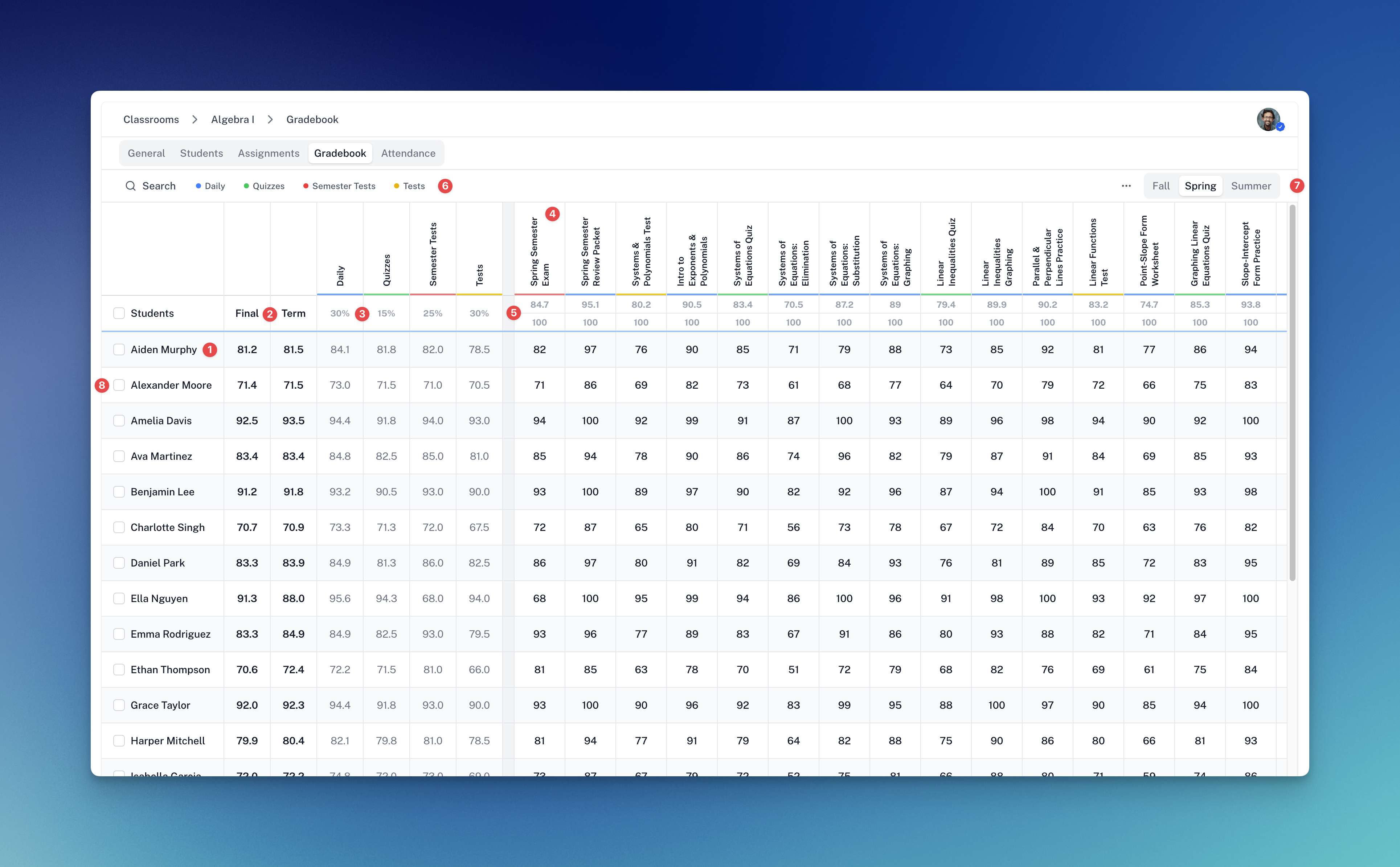
- Sticky Students column — stays pinned as you scroll horizontally.
- Final and Term grades — each student's overall and current-term grade.
- Category weight — the percentage each category contributes to the final grade.
- Assignment column — click the header to open the assignment's detail page.
- Average / total points — current class average over the assignment's max points.
- Category filter — show only columns from one category.
- Term tabs — switch which term's assignments are visible.
- Student selection — scope Print and CSV export to specific students.
Filtering and searching
The gradebook toolbar gives you several ways to narrow the view:
- Search — filter students by name.
- Category filter — show only columns from one category at a time.
- Term tabs — switch which term's assignments are visible.
- Student checkboxes — select specific students; this scopes the Print and CSV export actions to just those students.
Entering Grades
- Click on the grade cell for the student and assignment
- Type the points earned
- Press Enter or click away to save
The grade saves automatically. The student's category and overall grades update immediately.
Keyboard navigation:
- Tab / Shift+Tab — move horizontally between cells
- Arrow keys — move in any direction
- Enter — commit the value and move down
- Leave blank for work not yet graded; enter 0 for missing work that should pull the average down
Undo and Redo
If you mis-type a grade, undo and redo are keyboard-only:
- ⌘Z (Mac) / Ctrl+Z (Windows) — undo
- ⌘⇧Z (Mac) / Ctrl+Y (Windows) — redo
Adding Comments to Grades
Comments give feedback on specific student work:
- Click the comment icon on a grade cell or in the grade detail footer
- Type your comment in the panel and post
- Check Share with family to make a top-level comment visible to linked guardians
Comments support two-level threads: a top-level post plus replies. Only top-level posts marked Share with family appear to guardians. Private comments and replies stay in the thread but are filtered for family viewers based on the top-level post's visibility.
Multiple teachers and guardians can participate in shared threads.
Using Assignment Labels
Labels are color-coded tags applied to individual grades — handy for marking work as missing, late, incomplete, or anything else your school tracks. They don't affect the numeric grade.
- Click on a grade cell
- In the detail panel, select one or more labels to apply
Labels are defined per-school at Settings > Grades > Labels. There are no built-in defaults — your school configures the full set of names and colors.
Printing the Gradebook
- (Optional) Tick the student checkboxes to limit the print to specific students
- Click Print in the toolbar
- Review the print preview
- Print or save as PDF
The printed gradebook includes student names, every assignment in the current view, grades, and calculated totals.
Exporting Grades to CSV
- Open the toolbar menu (ellipsis icon)
- Choose Export to CSV
The CSV includes student names, every assignment, and the points each student earned. If you have a term filter active, the export is scoped to that term. If you have students selected, the export is scoped to those students.
Understanding Grading Scales
SimpleGrader converts percentage grades to letter grades using your school's grading scale.
Example grading scale:
| Letter | Percentage | GPA |
|---|---|---|
| A | 90–100% | 4.0 |
| B | 80–89% | 3.0 |
| C | 70–79% | 2.0 |
| D | 60–69% | 1.0 |
| F | 0–59% | 0.0 |
Configure your grading scale in Settings > Grades. It applies school-wide to every classroom.
Grade Calculation
Final grades use category weights. SimpleGrader converts each graded assignment to a percentage and averages those percentages within its category. A 10-point assignment and a 100-point assignment have the same effect. SimpleGrader multiplies each category average by its weight, adds the results, and divides by the sum of the weights.
Example:
- Homework (weight 20): assignments average 90%
- Quizzes (weight 30): assignments average 85%
- Tests (weight 50): assignments average 92%
- Final grade: (90 × 20 + 85 × 30 + 92 × 50) / (20 + 30 + 50) = 89.5%