Terms
A term is a stretch of the school year with a name, a start date, an end date, and a weight. Terms belong to an academic year, and a year can nest them: a semester can hold three six-week terms and a final. Terms are the first thing a new school sets up, because almost everything else attaches to one.
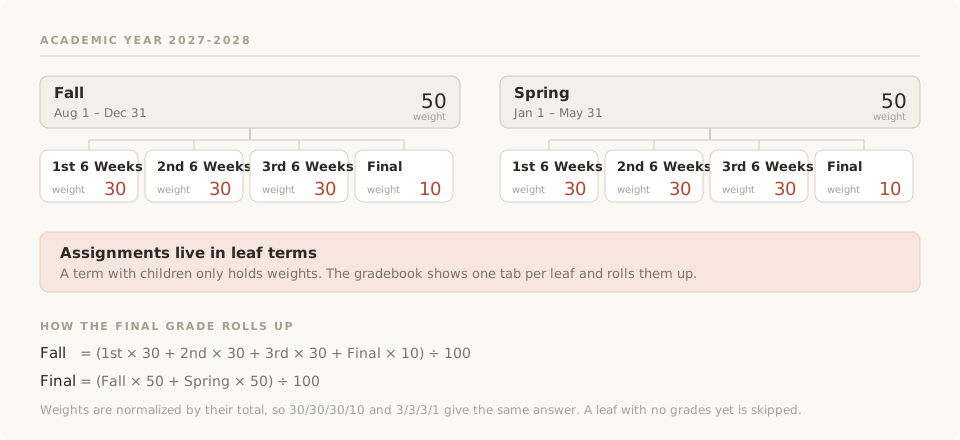
Two kinds of term
Leaf terms have no children. Assignments live in them, and the gradebook shows one tab for each. A six-week term, a quarter, or a semester in a school that does not split further is a leaf.
Parent terms hold other terms. They carry no assignments of their own; they exist to give their children a shared weight and a name on the report card. A semester made of three six-week terms and a final is a parent.
A year with no nesting, such as Fall and Spring, has only leaves.
How grades roll up
Grades are computed from the bottom of the tree to the top.
- A leaf term grade is the weighted average of the classroom's category averages for the work in that term.
- A parent term grade is the weighted average of its children, using the term weights.
- The final grade is the weighted average of the top-level terms.
At every level, weights are normalized by their total. Two semesters at 50 and 50 count equally, and so do two at 1 and 1. Three six-week terms at 30, 30, 30 with a final at 10 make the final worth a tenth of the semester. A term with no graded work yet is left out of the average rather than counted as zero, so a final grade in September is the first six weeks alone.
Where terms show up
- Assignments. Every assignment belongs to one leaf term. The assignment form suggests the term whose dates cover today.
- The gradebook. One tab per leaf term, and a final column that rolls them all up.
- Classrooms. A classroom belongs to one academic year. The year picker in the sidebar decides which classrooms, rosters, and records you are looking at. Past years stay where they are.
- Report cards and transcripts. Both are grouped by year and read the term grades above. A changed weight changes the record the next time it is generated.
- Dashboards and schedules. A section that meets on Mondays would match every Monday of the calendar, including ones in July. Before the dashboard lists today's classes or the phone shows a Today screen, it checks that today falls inside one of the year's terms and is not a closure. The gap between semesters is quiet for the same reason.
Closures
A closure is a day, or a run of days, with no school inside a term: Labor Day, Thanksgiving week, a snow day. Terms cannot say it, since splitting a term would move its weight. Closures are their own list under Settings › Schedule, for the year the sidebar is set to, with a name and a date. A break takes a last day as well; a single day needs none, and a Today button covers the snow day.
On a closure nothing meets. The dashboards list no classes, no attendance is asked for, and a teacher's attendance streak skips the day rather than breaking. Winter break needs no closure, because it falls between two terms. Closures appear once the school has a section; without one there is no schedule to quiet.
Setting up a year
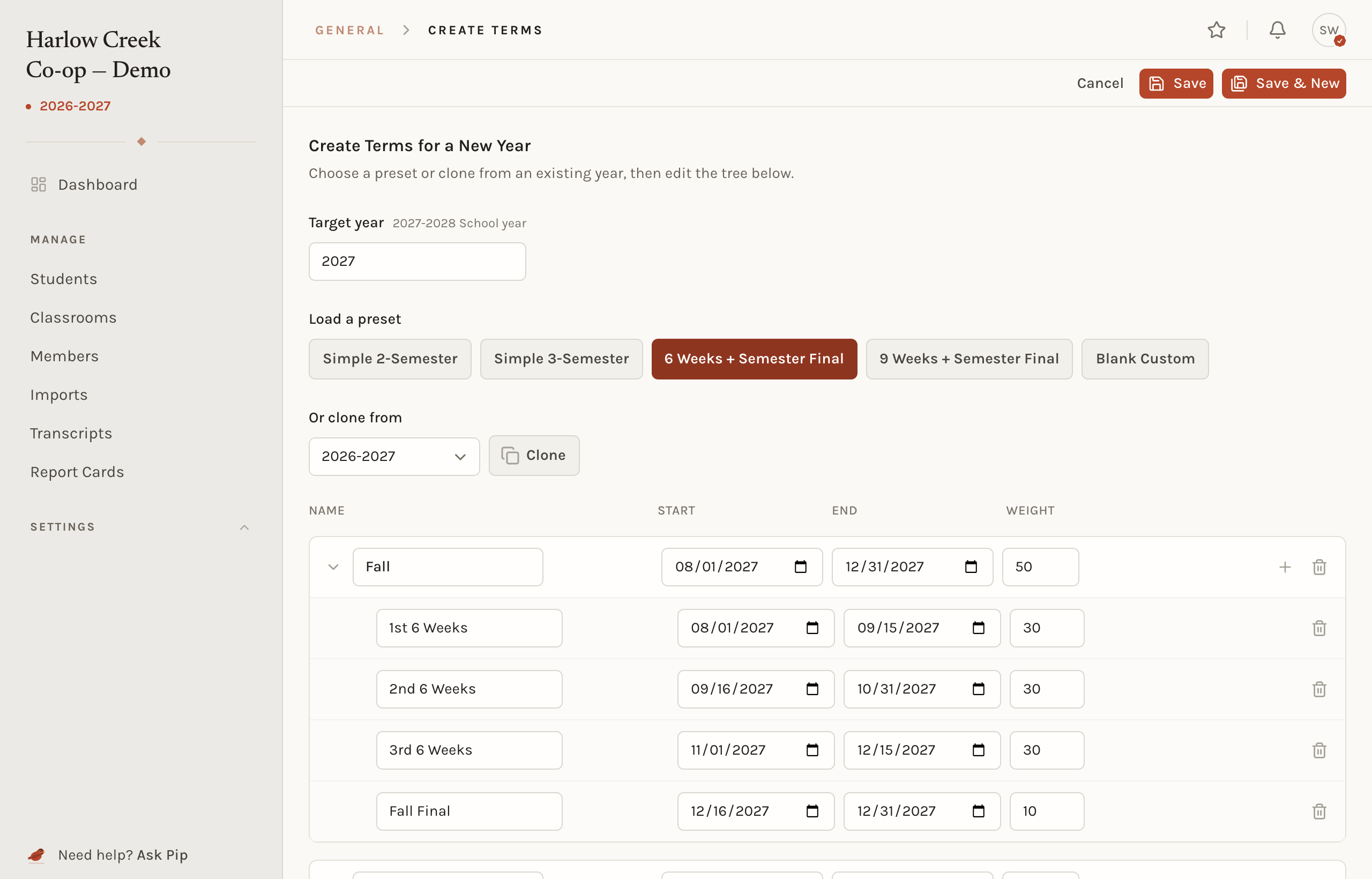
Go to Settings › Schedule and choose Create terms. Pick a target year, then start from a preset or clone last year with every date shifted forward twelve months.
| Preset | Shape |
|---|---|
| Simple 2-Semester | Fall and Spring, 50 each |
| Simple 3-Semester | Three equal terms |
| 6 Weeks + Semester Final | Two semesters, each with three six-week terms and a final |
| 9 Weeks + Semester Final | Two semesters, each with two nine-week terms and a final |
| Blank Custom | An empty year to build by hand |
Rename terms, set the dates to match the published calendar, adjust weights, and save.
Rules
- A term's end date cannot come before its start date.
- Names must be unique among siblings. Two semesters can each hold a term called Final.
- A year needs at least one term.
- Assignments can only be placed in leaf terms.
- Once any assignment exists in a year, that year's terms lock. Dates, names, and weights stop being editable, and the year cannot be deleted. This protects the grades already computed against those terms.
About a month before the next year is due to start, administrators see a dashboard prompt asking for next year's terms. The date is estimated from the start of the newest year the school already has, so it lands when a published calendar is likely in hand.
Common situations
- The dates are wrong and no assignments exist yet. Open the year in Settings › Schedule, fix them, and save.
- The dates are wrong and assignments exist. The year is locked. Write to support and say what should change; it can be corrected by hand with every grade preserved.
- A new year with the same shape. Clone the previous year. Every term shifts forward and keeps its weight.
- The dashboard shows no classes today. Check that today falls inside a term of the year the sidebar is set to, and is not a closure. Over the summer and between semesters this is expected.
- School is closed today. Under Settings › Schedule, add a closure: a name, then Today. The dashboards go quiet at once and nothing is recorded as missing.
Related concepts
Weights inside a term are a category matter. What a term grade is called is a grading scale matter. Terms also gate the Today lists that sections build.