Billing
Every school pays for the students it has and nothing else. There are no tiers, no per-teacher fees, and no trial clock. The first five active students are free for as long as the school exists, and no card is asked for until a school grows past them. Above five, a school pays monthly by the day or yearly by invoice.
| Monthly | Yearly | |
|---|---|---|
| Price | $1.50 per active student a month, prorated by the day | $15 per student a year, two months free |
| Count | The day's highest active count, measured every day | The roster you expect, agreed before the invoice |
| Payment | Card on file, charged each month | One invoice, paid by card or check |
| Roster changes | Settle on the next bill | Nothing changes until renewal |
Only the school's owner sees Settings › Billing. Other administrators see the notices, not the page.
What counts: active students
A student is active unless they are archived. Deleted students do not count either. The count is school-wide: a student in four classrooms counts once, and a student in none still counts.
Archiving is the lever. Archive a student who has left and they leave the count the same day, with their records intact. Restore them and they are back.
How a day is measured
The bill is built from days, not from a snapshot at month end. Each time a student is added, archived, restored, or removed, the app records the school's active count against today's date in the school's timezone, and keeps the highest figure the day reached. A student added at nine and archived at ten still counts for that day. A student archived at nine counts from tomorrow, not today.
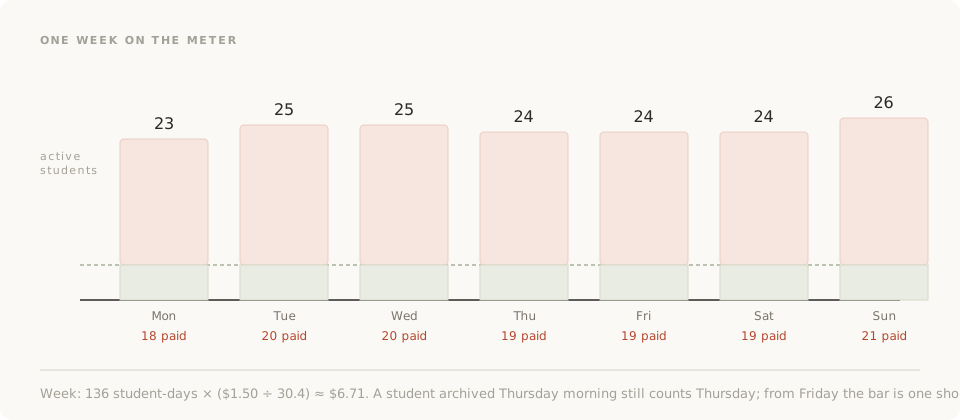
The billing page shows this as a trend line, so a surprise on the bill can be traced to the day it happened.
Monthly billing
Start it from the billing page with Start monthly billing, which opens a card checkout. Tax is added by location. From then on:
- Every morning the app reports yesterday's paid students, the day's high count less the allowance, to the meter.
- The meter prices each student-day at $1.50 divided by the average month, so twelve months of a steady roster come to twelve times the monthly rate and not a cent over.
- The month's invoice is the sum of its student-days, charged to the card on file.
| Roster | Paid students | Monthly bill |
|---|---|---|
| 5 all month | 0 | $0.00 |
| 25 all month | 20 | $30.00 |
| 25, one joins on the 20th | 20, then 21 | About $30.50 |
| 25, one archived on the 3rd | 20 for three days, then 19 | About $28.65 |
Receipts, past invoices, and the card itself live in the billing portal, opened from the billing page.
Cancelling
Cancel from the billing page. Access continues to the end of the paid period, and the cancellation can be undone until then. After that the school drops back to the free allowance with every record in place. Nothing is deleted; deleting a school is a separate action that only the owner can take. Refunds are given in full within 30 days of a charge, on request.
Yearly billing
Some business offices would rather approve one invoice than watch a card meter. Ask from the billing page with the yearly billing form, or email support with the roster size. What follows:
- The price is $15 per student a year above the first five, which is two months free against monthly.
- One invoice for the year, with a purchase order number on it if the office needs one, paid by card or check.
- No card on file and nothing charged monthly while the year runs.
- The count is the roster the school expects, with room built in. Nothing is prorated during the year, and growing past the figure never locks anyone out.
- The billing page shows Paid through. The count is reviewed at renewal, and support gets in touch before then.
When a free school grows past five
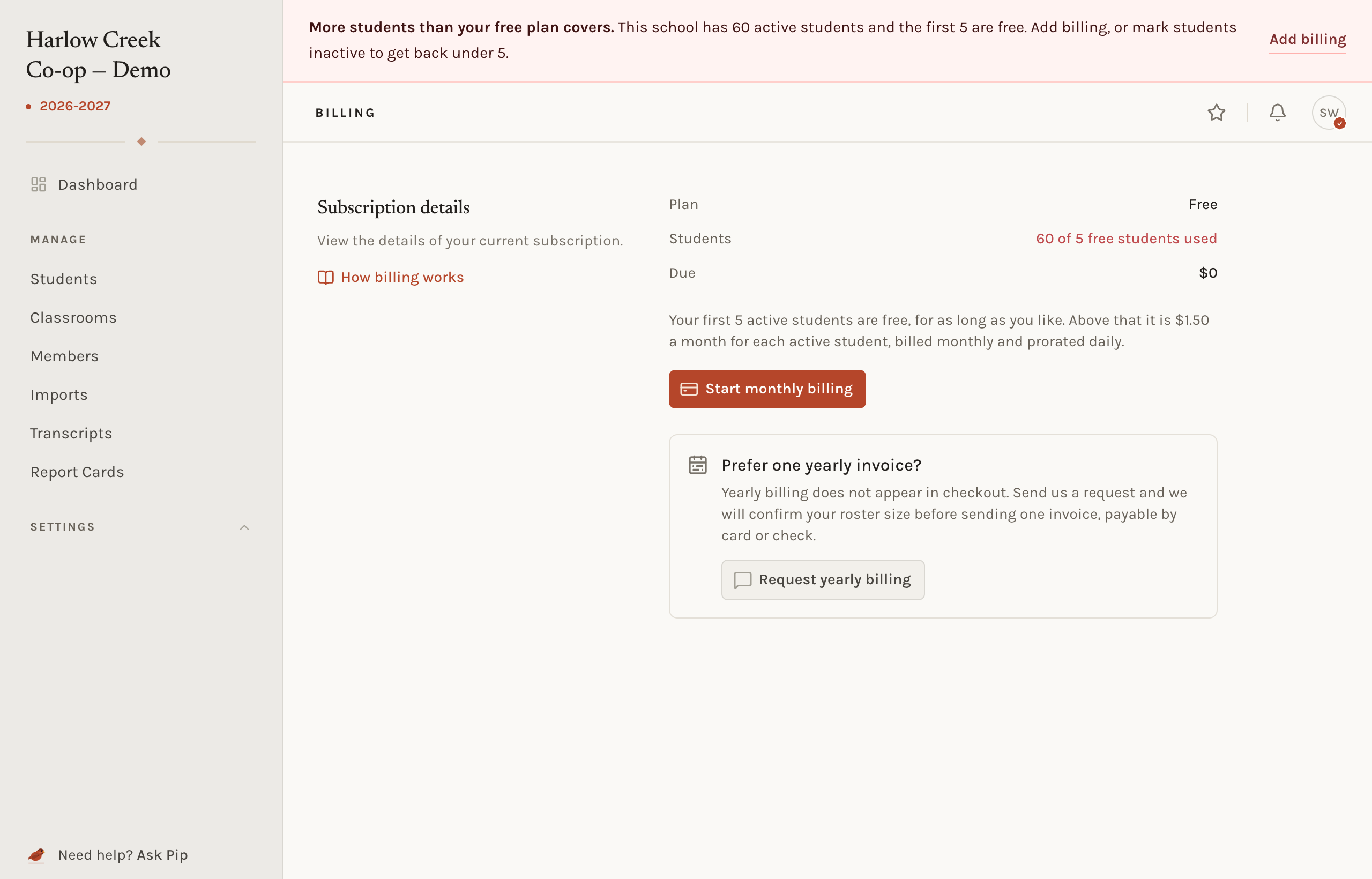
Nothing is refused. A school can add a sixth student, or import a hundred. On the next request the app shows a notice that the school has more students than the free plan covers, and closes every page except the ones that fix it: the students list, where students can be archived, the billing page, the account page, and support. Get back under five or start billing and the school opens again. No record is touched either way.
Common situations
- The bill is higher than the roster suggests. Open the usage trend on the billing page. A day's high count includes students who were archived later that day, and an import that was trimmed the next morning still counts for the day it landed.
- A student left mid-month. Archive them. They cost only the days up to and including that one.
- The card was declined. The billing page shows a warning while the payment is retried. Update the card in the billing portal. Access is not cut off during the retries.
- The school wants to switch from monthly to yearly. Ask through the yearly billing form. The monthly subscription is ended and the invoice raised for the year ahead.
Related concepts
Only active students are billed, and archiving is done from the students list. Who can see the billing page is a permission of the owner alone.