Grading scales
A grading scale is a list of stops. Each stop has a letter, a GPA value, and the lowest percentage that earns it. Grades are computed and stored as percentages everywhere in the app; the scale is only the label put on top. Change the scale and every letter in the school changes with it. No percentage moves.
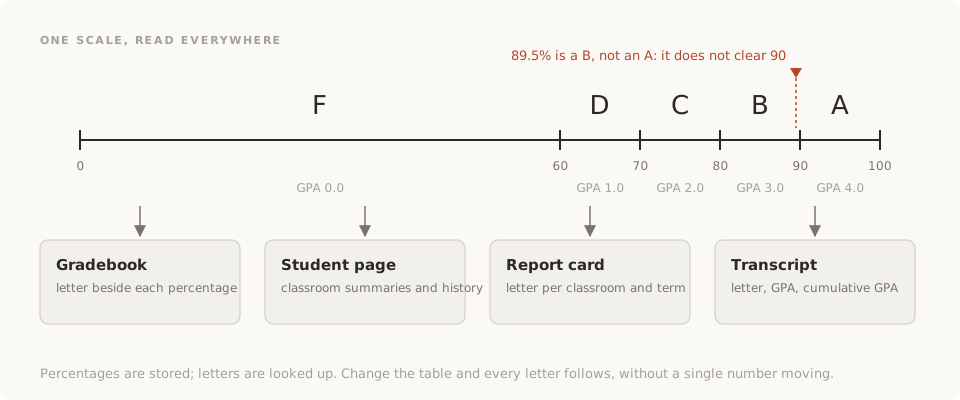
How a letter is found
The app walks the scale from the top and stops at the first row whose minimum the percentage clears. Each row covers everything from its minimum up to, but not including, the next row's minimum. On the common scale below, 91 clears 90 and is an A. 89.5 does not clear 90 and is a B. The percentage is rounded to one decimal first, the same as it is shown, so the letter always matches the number beside it: 89.95 shows as 90.0 and is an A. No row has a maximum of its own: the top row also takes a percentage above 100, such as 104 after extra credit.
A common scale:
| Letter | GPA | Minimum % | Covers |
|---|---|---|---|
| A | 4.0 | 90 | 90 and up |
| B | 3.0 | 80 | 80 to under 90 |
| C | 2.0 | 70 | 70 to under 80 |
| D | 1.0 | 60 | 60 to under 70 |
| F | 0.0 | 0 | 0 to under 60 |
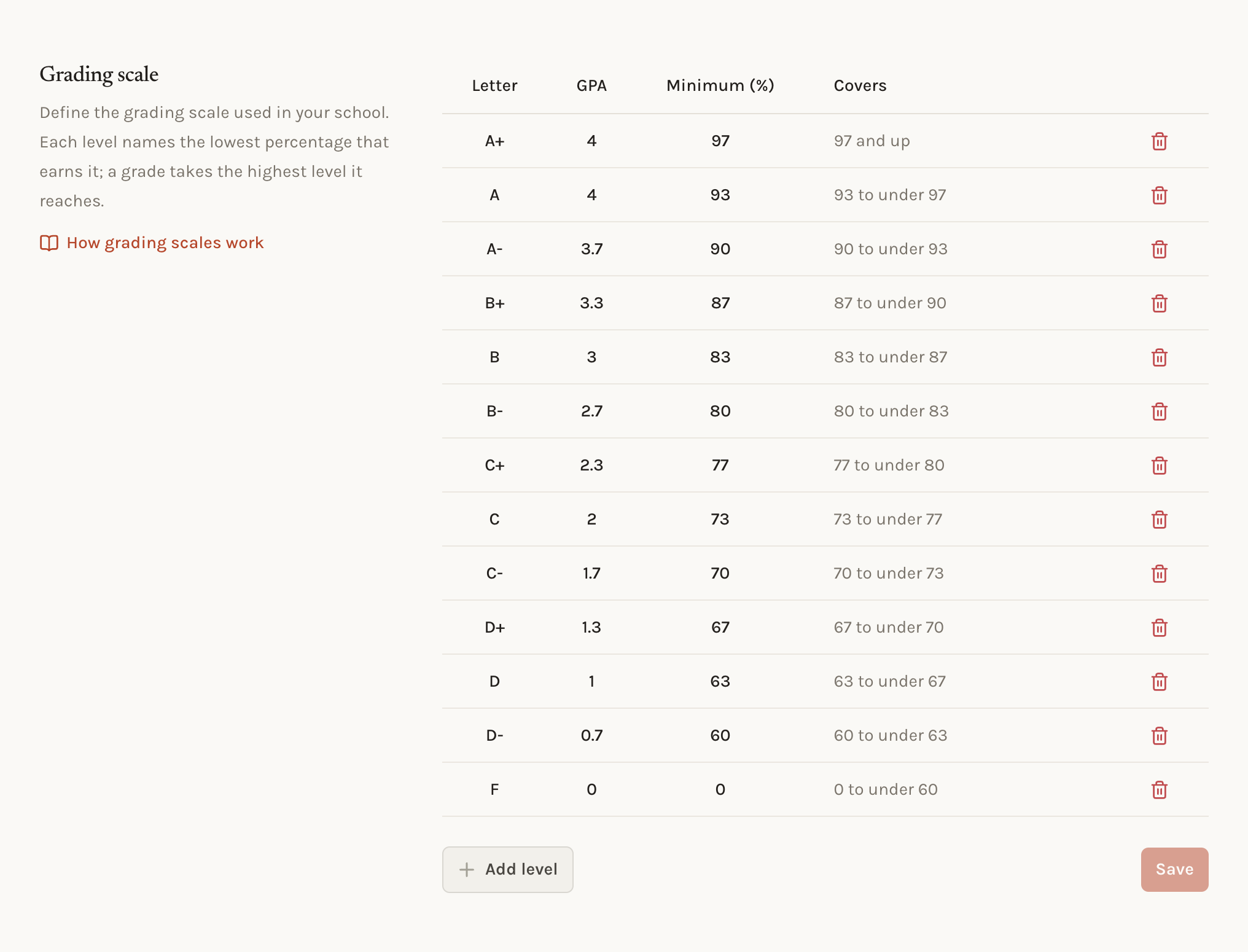
Plus and minus grades are more rows: A at 93, A- at 90, B+ at 87, and so on, each with its own GPA. A pass/fail scale is two rows.
Editing the scale
The scale is edited in Settings › Grades. Each row has a letter, a GPA, and a minimum percentage. The table shows what each row covers, worked out from the row above it. Rows are sorted by minimum, high to low, when the scale is saved.
Rules
- No two rows may share a minimum. There are no gaps to mind: each row runs until the next one starts.
- GPA values run from 0 to 4 and must descend as the rows descend. Two rows may share a GPA, as A+ and A often do.
- The bottom row should start at 0. If it starts higher, percentages below it earn no letter, and the editor warns before saving.
- The scale needs at least one row.
Where the scale is used
Every place a grade appears reads the same table:
- The gradebook shows a letter beside each term and final percentage.
- The student page and the family dashboard show letters on each classroom summary and on the grade history.
- Report cards print the letter for each classroom and term.
- Transcripts print a letter and GPA per classroom, and a cumulative GPA weighted by each classroom's credits.
- The school dashboard counts students by letter to show where the school stands.
- Printed gradebooks and grade sheets carry letters so the paper matches the screen.
Changing the scale mid-year
Changing a stop recomputes every summary in the school the next time it is read, so the letters on screen and on the next printed record follow the new scale. Records already generated and stored, such as a report card sent home last term, do not change. Regenerate them if they should.
Common situations
- A student at 89.5 wants an A. The scale does not round. Lower the A row to 89.5 if the school rounds, and it applies to everyone.
- The school reports GPA on a 5-point scale. GPA values are capped at 4. Report the 4-point figure and convert outside the app.
- Two letters, one GPA. Give both rows the same GPA. The rule only forbids a lower row having a higher GPA.
Related concepts
The percentage the scale labels comes from category weights inside a term and term weights across the year. The scale only names the result.
Categories
Categories decide how much each kind of work counts toward a grade. Default categories give every new classroom the school's starting split.
Sections
Sections are the periods a school runs. They give students a schedule, tell teachers which class is meeting now, and file attendance by period.